top of page
Custom Image
So this is how you make your custom splash screen. you need photoshop. I'm using CS6. but other versions will be very simaler in the layout of settings. Lets get started.
Creating a New Image
You need to change from 16bit to 8bit
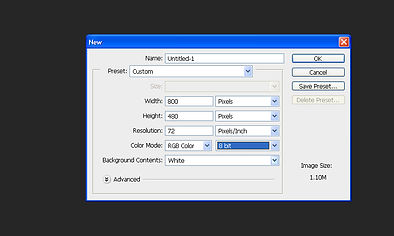
Create Your Image

Save your image as a .bmp
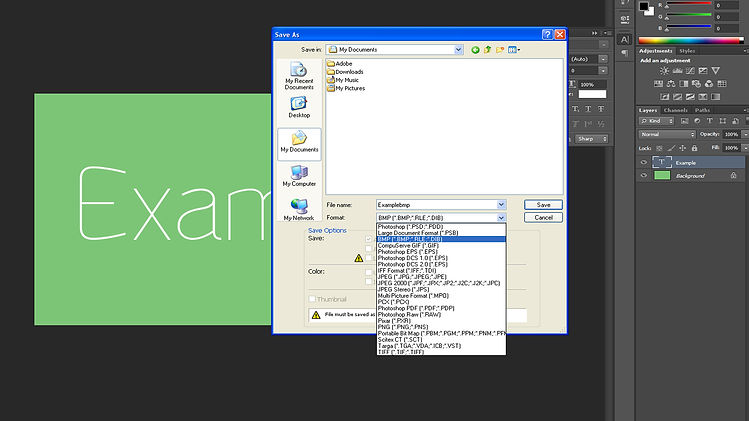
Advanced Options
After you select .bmp and have named your image "splashscreen" click save and you will be presented with this box
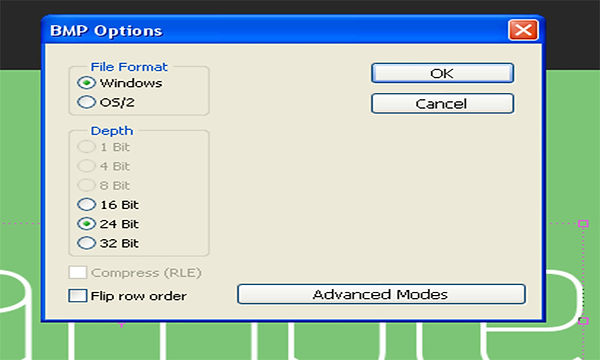
Click 16 Bit then Advanvced Modes
Select R5 G6 B5 and click OK
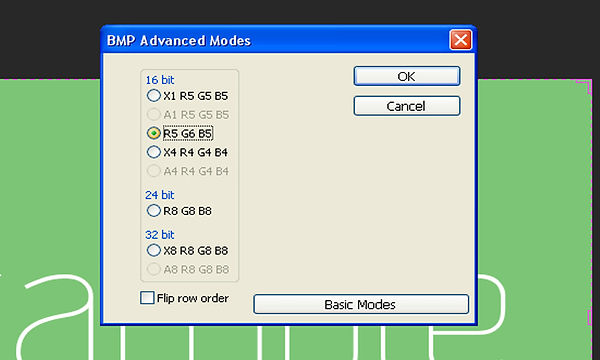
Thats your Custom Image done.
NOTE:It is important that you name your image "splashscreen" in order for it to work
bottom of page